In our previous deep dive, we explored the architecture of ApogeeDev Identity Provider, a custom enterprise-ready OIDC system built on ASP.NET Core, OpenIddict, and MongoDB. We focused heavily on securing user-facing applications using the Authorization Code flow with PKCE.
However, not all authentication involves a human user. In a microservices architecture, backend services, daemons, and background workers frequently need to securely communicate with one another. This is known as Machine-to-Machine (M2M) communication.
To support M2M authentication without user intervention, we implemented the OAuth 2.0 Client Credentials Flow. In this follow-up, we’ll walk through the architectural updates and code changes required to support this flow securely and efficiently.
The Client Credentials Flow
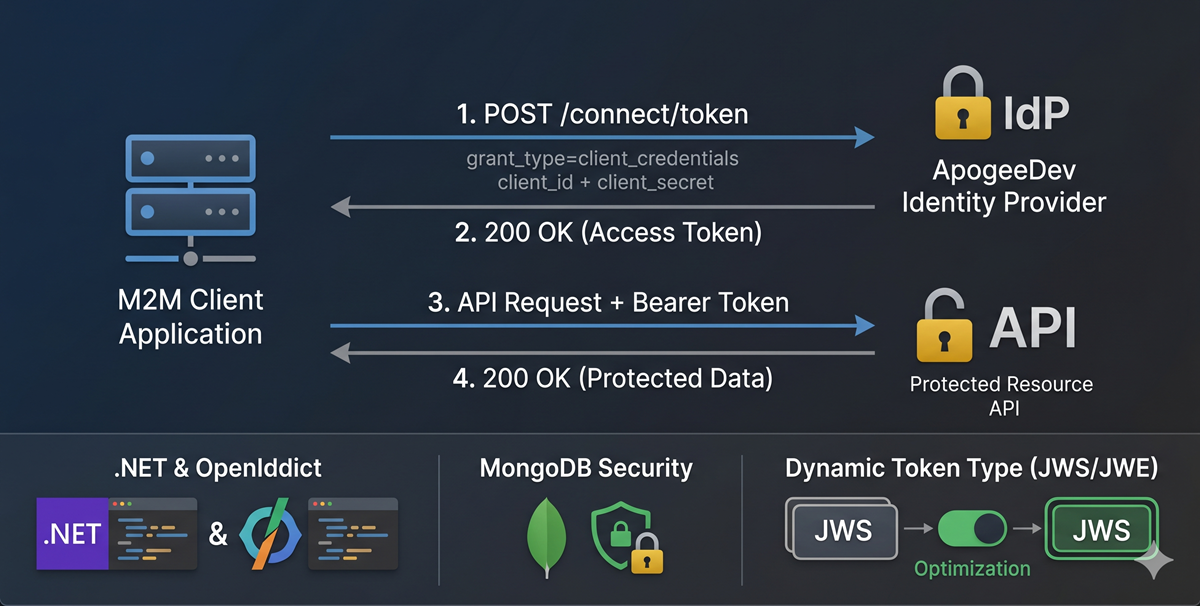
Unlike the Authorization Code flow which requires browser redirects and user consent, the Client Credentials flow is entirely backend-to-backend. The client application authenticates directly with the Identity Provider using its own client_id and client_secret to obtain an access token.
  sequenceDiagram
    participant Client as M2M Client Application
    participant IdP as ApogeeDev Identity Provider
    participant API as Protected Resource API

    Client->>IdP: POST /connect/token
    Note over Client, IdP: grant_type=client_credentials<br/>client_id=... & client_secret=...
    IdP-->>Client: 200 OK (Access Token)
    Client->>API: API Request + Bearer Token
    API-->>Client: 200 OK (Protected Data)
1. Enabling the Flow in OpenIddict
First, we need to instruct OpenIddict to allow the Client Credentials grant type at the server level. We updated our AuthServerExtension to explicitly enable this flow alongside our existing configuration.
// src/ApogeeDev.IdentityProvider.Host/Helpers/Authentication/AuthServerExtension.cs
services.AddOpenIddict()
    .AddServer(options =>
    {
        // ... existing configuration
        options.AllowAuthorizationCodeFlow()
               .AllowRefreshTokenFlow()
               .AllowClientCredentialsFlow(); // Enabled M2M Flow
        // ...
    });
2. Handling the Token Request
When a client application requests a token via the /connect/token endpoint, the request reaches our OAuthController. Since there is no user involved, we must construct a ClaimsIdentity that represents the application itself.
Notice how we map the ClientId to both the Subject and Name claims. This is a critical distinction from user-centric flows.
// src/ApogeeDev.IdentityProvider.Host/Controllers/OAuthController.cs
if (request.IsClientCredentialsGrantType())
{
    var identity = new ClaimsIdentity(
        OpenIddictServerAspNetCoreDefaults.AuthenticationScheme,
        Claims.Name,
        Claims.Role);

    // Client Credentials must map back to the Application Client ID as the Subject
    var clientId = request.ClientId ?? throw new InvalidOperationException("Client ID is missing.");
    identity.AddClaim(Claims.Subject, clientId);
    identity.AddClaim(Claims.Name, clientId);

    var claimsPrincipal = new ClaimsPrincipal(identity);

    // Apply requested scopes (e.g., API permissions)
    claimsPrincipal.SetScopes(request.GetScopes());

    return SignIn(claimsPrincipal, OpenIddictServerAspNetCoreDefaults.AuthenticationScheme);
}
3. Configuring M2M Clients and Permissions
A client utilizing the Client Credentials flow is inherently a Confidential Client (since it must securely store a secret) and typically represents a server-side application. Furthermore, it doesn’t need interactive properties like Redirect URIs.
We updated our CQRS command handlers to automatically enforce these invariants. When creating or updating an application, we check if the selected FlowType is client_credentials:
// src/ApogeeDev.IdentityProvider.Host/Operations/RequestHandlers/Models.cs
public static (IEnumerable<string>, IEnumerable<string>) MapRequirementPermissions(this AppClientData data)
{
    var permissions = new List<string>();
    var requirements = new List<string>();

    if (data.FlowType == OAuthFlowTypes.ClientCredentials)
    {
        // Grant endpoint and flow permissions natively
        permissions.Add(Permissions.Endpoints.Token);
        permissions.Add(Permissions.GrantTypes.ClientCredentials);
        permissions.Add(Permissions.Scopes.Roles);
    }
    else
    {
        // Handle Authorization Code permissions...
    }

    return (permissions, requirements);
}
In our command handler (AppClientAddRequestHandler.cs), we enforce the client type:
if (request.Data.FlowType == OAuthFlowTypes.ClientCredentials)
{
    logger.LogInformation("Setting client type to confidential and application type to web for client credentials flow");
    clientType = ClientTypes.Confidential;
    applicationType = ApplicationTypes.Web;
}
4. Skipping Token Encryption (Interoperability & Performance)
By default, OpenIddict encrypts access tokens to produce JWE (JSON Web Encryption) tokens. While excellent for security over untrusted networks, this can present interoperability challenges. For instance, when using an M2M access_token to call AWS STS AssumeRoleWithWebIdentity to access AWS services, the token must be a standard JWS (JSON Web Signature). AWS cannot decrypt a JWE without access to your private key. Additionally, internal microservices communicating within a secure VPC might prefer the performance gain of skipping payload encryption (relying solely on TLS and JWT signatures).
We introduced a dynamic optimization using OpenIddict’s event model. We created a ConfigureAccessTokenEncryption handler that intercepts the ProcessSignInContext. If a specific client has SkipTokenEncryption configured in its MongoDB properties, we disable encryption for its tokens on the fly, yielding a standard JWS.
// src/ApogeeDev.IdentityProvider.Host/Helpers/Authentication/ConfigureAccessTokenEncryption.cs
public class ConfigureAccessTokenEncryption(OperationContext opContext, ILogger<ConfigureAccessTokenEncryption> logger)
    : IOpenIddictServerHandler<ProcessSignInContext>
{
    public const string SkipTokenEncryptionProp = "SkipTokenEncryption";

    public async ValueTask HandleAsync(ProcessSignInContext context)
    {
        if (context.AccessTokenPrincipal is not null && !string.IsNullOrWhiteSpace(context.Request.ClientId))
        {
            var app = await opContext.ApplicationManager.FindByClientIdAsync(context.Request.ClientId, context.CancellationToken);
            if (app is not null)
            {
                var properties = await opContext.ApplicationManager.GetPropertiesAsync(app, context.CancellationToken);

                // Dynamically alter encryption behavior for specific clients
                if(properties.TryGetValue(SkipTokenEncryptionProp, out var skipEncryptionValue) &&
                   skipEncryptionValue is JsonElement jsonElement &&
                   jsonElement.ValueKind == JsonValueKind.True)
                {
                    context.Options.DisableAccessTokenEncryption = true;
                }
            }
        }
    }
}
This handler is injected directly into the OpenIddict pipeline just before the access token is generated:
// In AuthServerExtension.cs
o.AddEventHandler<ProcessSignInContext>(builder =>
    builder.UseScopedHandler<ConfigureAccessTokenEncryption>()
           .SetOrder(OpenIddictServerHandlers.GenerateAccessToken.Descriptor.Order - 1));
5. UI Updates for the Admin Console
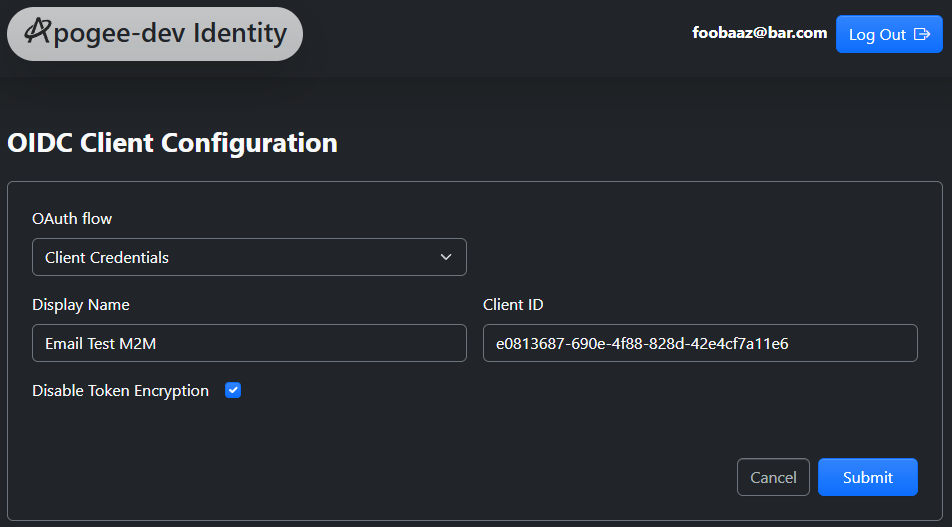
Finally, we updated our decoupled Vue 3 SPA management dashboard to support creating these M2M clients easily. We introduced a FlowTypeSelect component to toggle between flow types.
When “Client Credentials” is selected, the UI intuitively hides irrelevant fields (like Redirect URIs and PKCE) and exposes the new “Disable Token Encryption” optimization toggle.
<!-- src/idp-manager-app/src/components/clients/ClientEdit.vue -->
<div class="mb-4" v-if="!isAuthCodeFlow">
  <label for="disable-token-encryption" class="form-label text-light">Disable Token Encryption</label>
  <input
    type="checkbox"
    id="disable-token-encryption"
    v-model="model.skipAccessTokenEncryption"
    class="form-check-input ms-3"
  />
</div>
Summary
With these changes, ApogeeDev Identity Provider is now fully capable of securing complex microservice ecosystems. By supporting both user-interactive Authorization Code flows and headless Machine-to-Machine Client Credentials flows, we maintain absolute sovereignty over our identity architecture without compromising on flexibility or performance.